
Marketing strategy and planning
The marketing plan your whole team can see, and your data team can join.
Kleardata is where marketing writes down its strategy and plan. Every planned ad, email or message gets one kd_ ID that goes into its name in Meta, Google or Braze and into its link, so the warehouse can join results back to what you meant to do.
Request a workspace See what it does
Workspaces are opened by request while we onboard the first teams. Write to us and you get one with 30 days of full access. Prices are public: see pricing. Already have a workspace? Sign in.

Plans live in decks. Data lives in the warehouse. Nothing connects them.
-
Strategy is a slide
Goals and funnel splits never reach the campaigns that are supposed to deliver them, so nobody can say whether the plan covers the strategy.
-
Meaning is packed into strings
Channel, stage and audience hide inside campaign names and UTMs. Fixing a typo means re-tagging, and analysts parse names with regex.
-
Nobody can see the plan
What the agency proposed, what got built and what is in market to whom is spread across decks, spreadsheets and platform screens.
How it works
From business model to joined data in four steps.
-
Start from a template
Choose one of 12 business models. Kleardata seeds the funnel, audiences, conversion events, objectives and a starter strategy. Everything stays editable.
-
Plan against the strategy
Edit in the app, or build through your AI assistant or the API: draft a whole program in one message, expand a grid of audiences by markets, or clone last year's program. The coverage check shows where the plan and the strategy disagree.
-
Preview, then publish
See every name, tagged link and ID before anything is minted. Publishing creates a
kd_ID for every ad, email or message that will go live. -
Hand off and trace back
The person or agent who builds in each platform gets a setup spec and bulk files. The ID in each name and URL joins sessions and spend to the plan.
One key
One ID follows the plan all the way to the warehouse.
The same kd_ ID is in the name inside Meta or Braze and in the link's utm_id. Your data team joins on it. No parsing campaign names, no guessing which campaign was which.
-
In the plan
Upgrade nudge email
Marketing stage: conversion
Goal: convert 22% of trials to paid -
In the ad platform
Upgrade nudge email | kd_4a2w917The name your operator or agent builds from the setup spec
-
In the link
…utm_campaign=teams_promo&utm_id=kd_4a2w917Tagged for you, so nobody types a UTM by hand
-
In the warehouse
join on kd_idSessions and spend meet the stage, audience, goal and campaign
Example from a demo workspace. IDs are created when a plan is published.
Coverage check
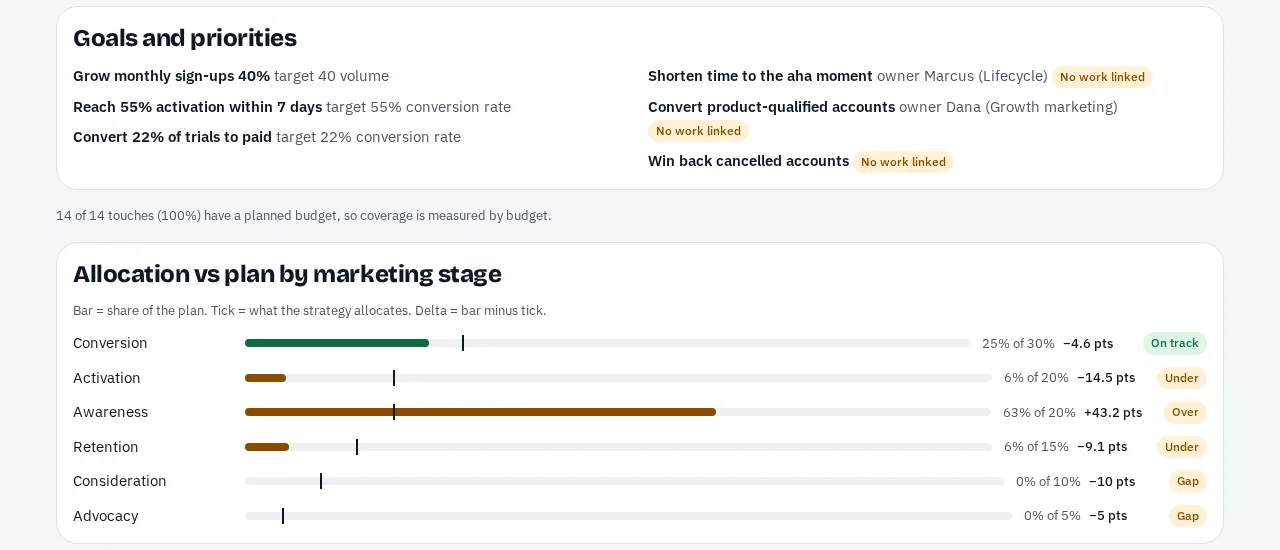
See where the plan drifts from the strategy.
Set goals and a planned split across marketing stages and channels. Kleardata compares them to the plan and flags gaps in both directions: strategy the plan does not deliver, plan activity that is off-strategy, and priorities with no campaign behind them.
- Measured on planned budget where you have it, and on touch counts where you do not.
- Unusual stage and audience pairings get a warning, never a block.
- Every gap has a next step: start a plan for it, or adjust the allocation.
In market
Know what is live, to whom, and with what creative.
Leads want to see the marketing. The in-market view shows everything running on a date, with its stage, channel, audience, IDs, creative readiness and planned budget. Pick any date and filter by stage, channel or audience.
- Touch status is derived from the plan and its dates, not maintained by hand.
- Each asset slot holds copy, a link, or a small thumbnail, so people can see the ad.
- Agencies propose plans in your workspace. You accept or decline.

Publish preview
No surprises when the IDs get minted.
Before you publish, Kleardata shows exactly what it will create: each placeholder ID, the name that goes into the ad platform, and the tagged link. Blocking errors stop a publish. Anything unusual is a warning.
- Names fit each channel, and links carry the ID as a parameter.
- Required fields come from your own rules, not ours.
- IDs are created only when you publish, and that cannot be undone.

Smart defaults
A working starting point for 12 business models.
Each template seeds stages, audiences, conversion events, objectives and a starter strategy for how that kind of business actually markets. Every template passes automated quality checks before it ships, and every value can be renamed or replaced.
Look in the app. Work through your assistant.
The web app is for looking, checking, publishing and settings. Most of the writing and bulk work happens through an AI assistant over MCP, or the API. Built for the people who decide what marketing does:
-
Marketing leads and planners
Set the strategy, build the plan, and answer “what is in market, to whom, and when” without opening five tools. Show what marketing delivered by goal, not by argument.
-
Data teams
The registry is the dictionary of marketing intent. Every row in the warehouse maps to a goal, stage, audience and campaign through one key.
-
Agencies and partners
Propose plans in your client's workspace, fill creative slots, and let the client accept or decline. Agency seats are free on every plan.
-
Operators and agents
Whoever builds in Meta, Google or Braze gets a setup spec and bulk files, and marks each touch built. A recipient, not a customer.
On purpose
What Kleardata leaves out.
Staying a planning record is what keeps it simple and keeps it honest.
-
No ad-platform integrations
Kleardata does not push to Meta, Google or your ESP. It hands a spec to the person or agent who does, so there is no integration to maintain.
-
No spend or performance data
Kleardata holds planned intent. Actuals stay in your warehouse, and Kleardata never needs access to it.
-
No task manager, no CDP
No assignees, due dates or approval chains, and no segment logic. Audiences are labels and intent; the rule that builds a segment stays where it lives.
Pricing
Flat prices, on a credit card.
Prices in US dollars. Annual billing is two months free. Compare plans
Start from a strategy built for your business model.
Pick a template, review the starter strategy and two starter plans, and see where your plan stands.